


Skip to content
VyeltaFree evaluation

Features

Everything follows your metamodel.

Vyelta answers one question well: what does this change touch? Every screen below works from the same repository and follows the rules you set for it.

Impact analysis

What is affected, what it relies on, and why.

Start from any object. Vyelta walks your architecture along the rules of your metamodel and groups every result by layer.

  • Upward: what is affected if this fails
  • Downward: what this relies on, traced down to technology
  • Choose how many layers deep to go
  • Every result shows how many links away it is and the path that explains it
  • Directly linked objects that a failure does not reach are listed apart, with the reason
  • Export the result to CSV, or open it as an architecture view
Impact analysis in Vyelta: what the Digital Bank 2030 vision relies on, grouped by layer, with the path for each result
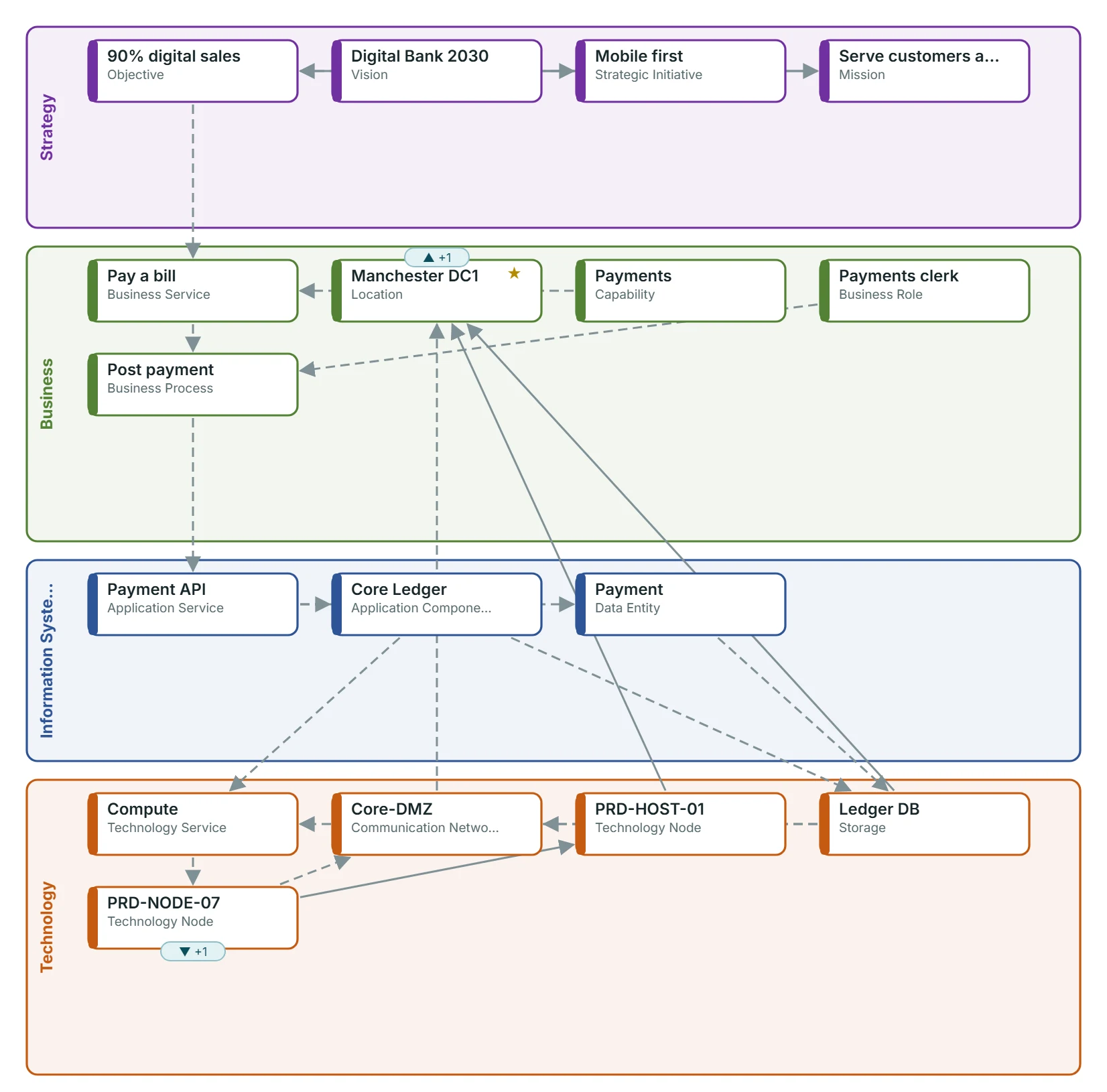
An impact result opened as a view: from the Manchester DC1 data center through storage, networks, applications and business services to the Digital Bank 2030 vision
The same kind of result opened as a view: what a data center outage reaches, from the servers on it to the 2030 vision. Example data.

Architecture views

Draw the slice that matters, never the whole thing.

Pick start objects, a direction and a depth. Vyelta lays them out in layer bands, from strategy down to technology.

  • Expand and collapse as you go
  • Save views and reopen them later
  • Export PNG, SVG or PDF for your documents and presentations
An architecture view in Vyelta: 18 objects and 22 relationships in layer bands from strategy to technology, with buttons to export PNG, SVG or PDF

Metamodel designer

Your framework, not ours.

Layers, object types, fields and relationship rules are your data, not our code. Start from the ready Core model, with 5 layers and 25 object types, or shape your own.

  • Each rule says how a failure spreads along it, so impact analysis follows your logic
  • Locked by default; only an Administrator can unlock it
  • A change that would damage existing data is refused, with the reason
  • Every change to the metamodel is recorded in the change history
  • Export the metamodel as a file and load it into another repository
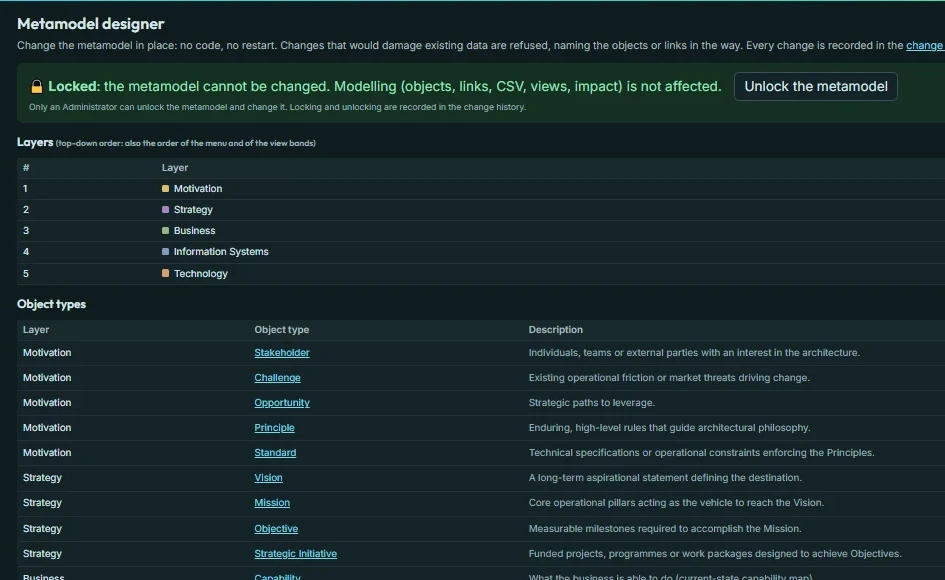
The Metamodel designer in Vyelta, locked: the five layers of the Core model and its object types, each with a description, its fields and its number of objects

Explorer

Build top-down, one allowed step at a time.

Start at the top of a breakdown, for example your vision, and add what sits below it. Vyelta offers only the steps your metamodel allows.

  • Add below, link above, and reuse objects that already exist
  • Invalid links are refused; missing expected links are marked
  • From any object: its history, a view from here, or an impact analysis from here
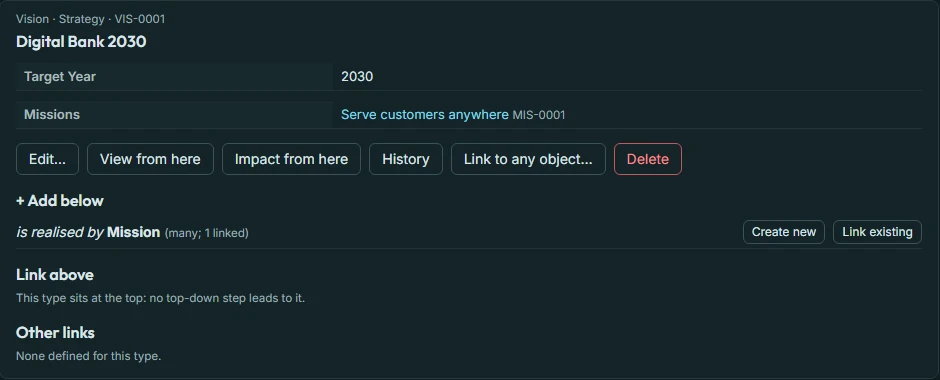
The Explorer in Vyelta: the Digital Bank 2030 vision with its fields, the step it allows below (is realised by Mission), and buttons for history, a view and an impact analysis from here

Matrix

One relationship rule as a grid.

One object type across, the other down. A tick means linked; click a cell to link or unlink at once.

  • Every click is checked against the rule; a refusal is explained in plain words
  • Undo the last change
  • Each row and column shows its link count and any missing link
  • Filter rows and columns, swap them, and export the grid to CSV
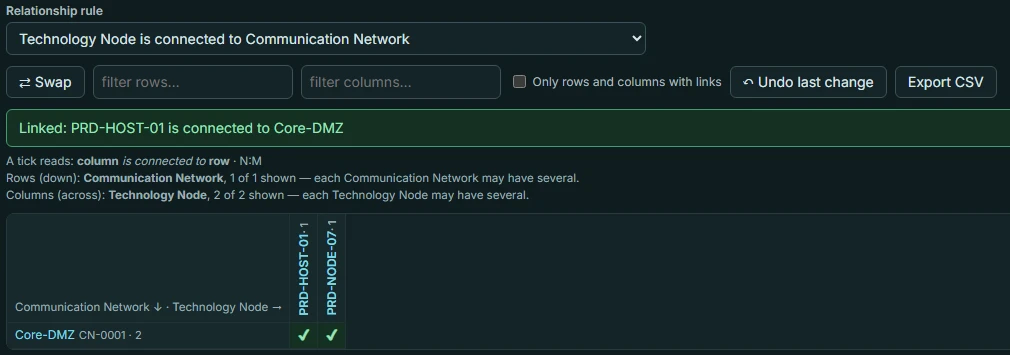
The Matrix in Vyelta: the rule Technology Node is connected to Communication Network as a grid, with a confirmation that a link was made

Shape it, fill it, keep it clean.

Data in and out

Bring in what you already have in spreadsheets, and take everything out again.

  • CSV import with a “check only” test run that changes nothing
  • CSV export of objects, links, impact results and the change history
  • A validation report that lists what breaks your rules or is incomplete

Governance

Know who can change what, and who did.

  • Viewer, Architect and Administrator roles
  • A change history of every change: who, when, before and after
  • Nobody can alter or delete the history from within Vyelta, not even an Administrator
  • Filter the history by person, date or object, and export it

Your brand

Your organization’s name and logo on every screen and on every exported view.

  • Set by an Administrator, shown on the sign-in page too
  • Consultancies can brand a copy for each client

Works where you work

Vyelta runs in your web browser. There is nothing to install for the people who use it.

  • A current Chrome, Edge or Firefox on a computer
  • Light and dark mode

What Vyelta does not do

Vyelta focuses on structure and impact. We would rather tell you now than during your evaluation.

  • No process modeling (BPMN) or software design (UML). Vyelta works alongside the tools you use for those.
  • No company sign-in (single sign-on). People sign in with a Vyelta username and password.
  • No phone screens. Use a computer.

Try it on your own architecture for 90 days.

Free, private, nothing to install. We reply within 2 business days.

Request a free 90-day evaluation